Hard Drive Destruction. Shredded, Degaussed, or Wiped.
Physical destruction and secure erasure for hard drives, SSDs and backup media, with documentation that says which method was used on what.
Hard drive destruction is the permanent removal of data from storage media, by physically shredding the drive, degaussing it with a strong magnetic field, or overwriting it with certified erasure software. PrivAce arranges all three across India, with free pickup in Mumbai, Navi Mumbai, Thane and Pune, under the ISO/IEC 27001:2022 certification held by our parent company, and issues a Certificate of Destruction recording the method used.
Deleting files and reformatting a drive do neither: both leave the underlying data recoverable with freely available software.
Three methods, and when each one is right
The right method depends on the drive type, the sensitivity of the data, and whether the hardware has residual value worth preserving.
Software erasure overwrites every addressable sector so the original data cannot be reconstructed. It is the only method that leaves the drive reusable, so it is the right choice when the hardware still has resale value. It is effective on traditional hard disk drives; on SSDs it requires drive-specific secure-erase commands rather than a simple overwrite pass, because of the way SSDs distribute writes internally.
Degaussing exposes the drive to a magnetic field strong enough to destroy the magnetic domains holding the data. It is fast and effective for magnetic media: traditional HDDs and tape. It does not work on SSDs at all, because SSDs store data in flash cells rather than magnetically. A degaussed drive is permanently unusable.
Physical shredding reduces the drive to fragments. It is method-agnostic, it works on HDDs, SSDs, tape and optical media alike, and it is the option that produces the most visually convincing evidence for an auditor. It also eliminates any resale value, which is why it is usually reserved for the highest-sensitivity media.
HDDs and SSDs are not the same problem
This is the single most common technical mistake we see. Many IT teams apply an HDD-era wiping process to a fleet that is now mostly SSD, and assume the outcome is equivalent. It is not.
SSDs use wear levelling, which spreads writes across physical cells to extend the drive's life. A conventional overwrite writes to logical addresses, and the controller may map those writes to different physical cells than the ones holding the original data. Fragments of the original data can survive in cells the overwrite never touched.
The correct approach for SSDs is either the manufacturer's built-in secure-erase or cryptographic-erase command, or physical destruction. For any drive holding regulated or highly sensitive data, physical destruction removes the uncertainty entirely.
Bulk volumes and mixed media
Most of what we handle is not individual drives. It is drives still inside retired laptops, desktops and servers, plus loose drives that have accumulated in a store room over several refresh cycles.
Loose drives are the higher risk of the two. Drives pulled from decommissioned machines and put in a drawer have usually left every asset register, which means nobody is tracking them and nobody notices if one goes missing. If you have a drawer like that, it should be the first thing you clear.
We collect and process backup tapes, optical media, USB drives and memory cards alongside hard drives. If it stores data, it goes through the same process.
What the documentation covers
Every job produces a Certificate of Destruction recording what was destroyed, by which method, and when, alongside the e-waste manifest showing what left your premises and which authorized recycler received it.
Where a client's audit requires device-level detail, we record at that level. Where a consignment-level record is sufficient, we provide that. Tell us which your auditor expects and we will match it: there is no advantage to producing paperwork your process does not actually use.
Where we provide this.
Free enterprise collection across the Mumbai Metropolitan Region, and scheduled collection in Pune.
Frequently Asked Questions
Degaussing destroys data magnetically and leaves the drive physically intact but permanently unusable. Shredding physically reduces the drive to fragments. Degaussing only works on magnetic media such as traditional HDDs and tape; shredding works on any media type including SSDs.
No. SSDs store data in flash memory cells rather than magnetically, so a magnetic field has no effect on them. SSDs require either the drive's own secure-erase command or physical destruction.
No. Formatting removes the file index, not the data itself. The underlying content remains readable with freely available recovery software until it is overwritten or the media is destroyed.
Yes. Every job produces a Certificate of Destruction recording what was destroyed, by which method, and when.
Witnessed destruction can be arranged for sensitive jobs. Raise it at the assessment stage so it is scoped in from the start rather than added later.
Yes. Backup tapes, optical media, USB drives and memory cards are all collected and processed alongside hard drives.
No. PrivAce operates pan-India. We serve 497 cities across India. Mumbai, Navi Mumbai, Thane and Pune are our regular-pickup markets with scheduled routes and free collection. Everywhere else in India, Bengaluru (Bangalore), Hyderabad, Chennai, Delhi NCR including Gurugram and Noida, Ahmedabad, Kolkata and other cities, we assess the requirement and arrange collection based on volume, location and project scope. The data destruction process and the documentation you receive are identical wherever we collect; only the scheduling differs.
Last reviewed 30 September 2026. Reference: NIST SP 800-88 Guidelines for Media Sanitization and the E-Waste (Management) Rules, 2022.
Shred, Degauss or Wipe, and Why It Depends on the Media.
The three methods are not interchangeable, and the most common mistake in the industry is applying a hard-disk process to solid-state media.
| Method | Works on | Does NOT work on | Drive survives | You receive |
|---|---|---|---|---|
| Physical shredding | HDD, SSD, NVMe, tape, optical media | : | No | Certificate of Destruction |
| Degaussing | Magnetic media only: HDD, tape | SSD and NVMe: they hold no magnetic charge | No | Certificate of Destruction |
| Verified software erasure | HDD, SSD, NVMe (using the correct command per media type) | Failed or unreadable drives | Yes: value retained | Per-drive erasure certificate |
Degaussing does nothing to an SSD. A degausser destroys data by collapsing the magnetic field on a platter. Solid-state drives store charge in flash cells and have no magnetic field to collapse, so a degaussed SSD is an intact SSD with all its data on it.
If a vendor quotes degaussing for a mixed batch without separating the solid-state media, that is a material error and worth challenging. For SSDs the correct routes are the drive’s own secure-erase or cryptographic-erase command, or physical shredding.
Onsite at Your Premises, or Offsite at Our Parent Company’s Plant.
Banks, insurers and regulated firms often have an information security policy that forbids media leaving site. That is a normal requirement and we work to it.
| Onsite destruction | Offsite at the parent company’s plant | |
|---|---|---|
| Where | Your premises, your security team watching | MPCB-authorised Waluj MIDC facility |
| Best for | Regulated data, policies that forbid media leaving site | Volume disposal, mixed asset types, buyback-eligible hardware |
| You witness it | Yes, directly | Certificates after processing, serial lists on request |
| Documentation | Certificate issued on site, before we leave | Certificate + Form 6 Manifest + Recycling Certificate |
| Buyback possible | On non-destroyed assets | Yes, full assessment |
Most engagements use both: drives from finance, HR and executive machines destroyed onsite, everything else processed at the facility where it can also be assessed for buyback value.
Industry-Standard Erasure Tools.
When a drive is wiped rather than shredded, it is erased using licensed enterprise software, not a free utility and not a quick format. These are the two tools the industry standardises on, and we are a licensed partner.

Blancco is the most widely audited data erasure standard in enterprise ITAD, used by banks, governments and data centres worldwide. Every erasure produces a tamper-proof report recording the drive, the method and the result.

BitRaser Drive Eraser is certified for secure erasure across HDDs, SSDs and NVMe media, and generates a verifiable erasure certificate for each drive processed. PrivAce is a licensed BitRaser partner.
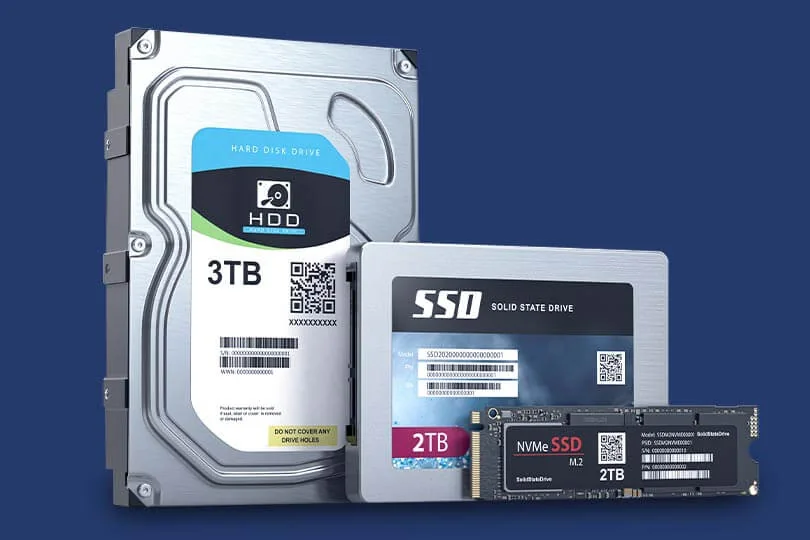
Every media type, handled correctly. HDDs, SATA SSDs and NVMe drives each need a different erasure method: applying an HDD process to an SSD is the most common mistake we see.
Blancco and BitRaser are trademarks of their respective owners. We name them because the tooling behind an erasure claim is a fair thing for a buyer to ask about, not as an endorsement by either company.
Ready to Securely Retire Your IT Assets?
Send a rough device list. We will confirm scope, schedule the pickup (free in Mumbai, Navi Mumbai, Thane and Pune), and tell you exactly which documents you will receive.